Glitter Script: A Handwritten Font for Digital Brands
I was halfway through redesigning a landing page for a boutique floral studio when I hit that familiar wall. The layout was clean, the photography was stunning, but the typography felt sterile. The client wanted warmth, elegance, and a touch of whimsy, yet every standard sans serif I tried made the brand feel too corporate. That is when I pulled Glitter Script from my library of Script Amp assets to test in the hero section.
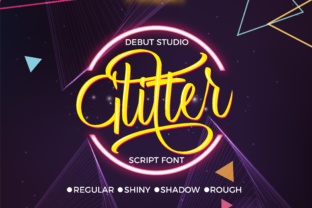
The difference was immediate. This font is inspired by handwriting itself, capturing the organic flow of a pen on paper rather than the rigid geometry of digital vectors. As I dropped it into the main headline, the ornamental charm and beauty of the typeface transformed the entire mood of the page. It was no longer just a website; it felt like an invitation. For web designers and UI creators, finding a script that balances personality with precision is rare, but Glitter Script delivers exactly that.
Testing Visual Hierarchy in a Real Layout
When integrating a decorative display font like this into a modern web design project, the primary concern is always readability. I started by placing Glitter Script in the hero banner, overlaying it on a soft, blurred background image of peonies. Because the font is crafted with precision and attention to detail, the strokes remained distinct even against the complex texture behind them.
In this specific case, I used the font for the main value proposition: "Bespoke Blooms for Every Occasion." The connected letters created a natural reading rhythm, guiding the user’s eye across the screen. However, I kept the body copy in a neutral sans serif font. This contrast is crucial for maintaining visual hierarchy. If you use a handwritten font for long paragraphs, users will struggle to scan the content, leading to higher bounce rates. By reserving Glitter Script for headlines, short phrases, and accent text, I ensured the site remained accessible while still feeling premium.
Mobile Responsiveness and Readability Checks
A critical step in my workflow is checking how typography performs on smaller screens. Script fonts can sometimes become illegible on mobile devices if the size is too small or the line height is too tight. I tested the Glitter Script implementation on several device viewports. At 320 pixels wide, the intricate details of the alternates held up well, provided I increased the font size slightly compared to the desktop version.
For buttons and call-to-action areas, I avoided using the script font entirely. Instead, I stuck to a bold sans serif for clickable elements to ensure clarity and tap-target accuracy. This is a best practice for UX-aware design. While Glitter Script adds immense character to logos, headers, and promotional banners, it should not compete with functional interface elements. The goal is to enhance the user experience, not hinder navigation.
Versatility Across Digital Projects
Beyond this floral studio project, I have found Glitter Script to be surprisingly versatile across different types of digital products. Its ornamental nature makes it ideal for industries where trust and personal connection are paramount. Here are a few scenarios where this typeface shines:
- Coaching and Consulting Websites: Use it for section headings to add a personal, approachable touch to professional services.
- Online Store Banners: Perfect for seasonal sales announcements or limited-time offers where you want to create excitement.
- Course Sales Pages: Great for highlighting testimonials or key benefits, making the content feel more human and less transactional.
- Portfolio Homepages: Creative professionals can use it to sign off on projects or introduce their bio, adding a signature-like authenticity.
- Digital Brand Kits: An excellent choice for social media graphics and email headers to maintain consistency across channels.
The key is moderation. In a recent campaign landing page for a handmade jewelry brand, I used Glitter Script only for the logo and the primary headline. The rest of the page relied on clean, modern typography. This approach allowed the font to act as a focal point without overwhelming the viewer. It created a sense of luxury and craftsmanship that aligned perfectly with the product.
Pairing Strategies for Modern Typography
Choosing the right companion font is just as important as selecting the script itself. Glitter Script pairs beautifully with simple, geometric sans serif fonts. The contrast between the flowing, organic curves of the script and the structured lines of a sans serif creates a balanced and professional look. For a more editorial or traditional feel, you might experiment with a light serif font for body copy, though this requires careful tuning of spacing and weight to avoid visual clutter.
I often recommend starting with a neutral typeface for the bulk of your content. Let Glitter Script handle the emotional heavy lifting in titles and accents. This strategy ensures that your brand identity remains clear and consistent. Whether you are designing a SaaS founder’s blog or a small business website, this pairing technique helps maintain readability while injecting personality.
Licensing and Technical Considerations
Before deploying any premium font on a client project, it is essential to review the licensing terms. Glitter Script comes with commercial font licensing options suitable for websites, online stores, and digital templates. Always check if the license covers webfont usage, as this affects how you embed the files in your CSS. Additionally, verify the available file formats to ensure compatibility with all major browsers.
I also recommend exploring the included styles and alternates. Many high-quality script fonts offer multiple versions of certain characters, allowing you to customize the flow and avoid repetitive patterns in longer headlines. Checking multilingual support is also wise if your audience spans different regions. These technical details might seem minor, but they significantly impact the final polish of your design assets.
In conclusion, Glitter Script is more than just a decorative element; it is a tool for building connection. By using it thoughtfully in hero sections, logos, and key messaging, you can elevate a standard web layout into a memorable brand experience. Just remember to prioritize readability, pair it wisely, and respect the technical requirements of web deployment. When done right, this handwritten font adds the perfect sparkle to your digital presence.